Building My Personal Website: Technical Highlights
This website is built with Astro using server-side rendering (SSR), styled with Tailwind CSS, and includes an AI chat interface powered by Google’s Gemini API. The source code is available on GitHub.
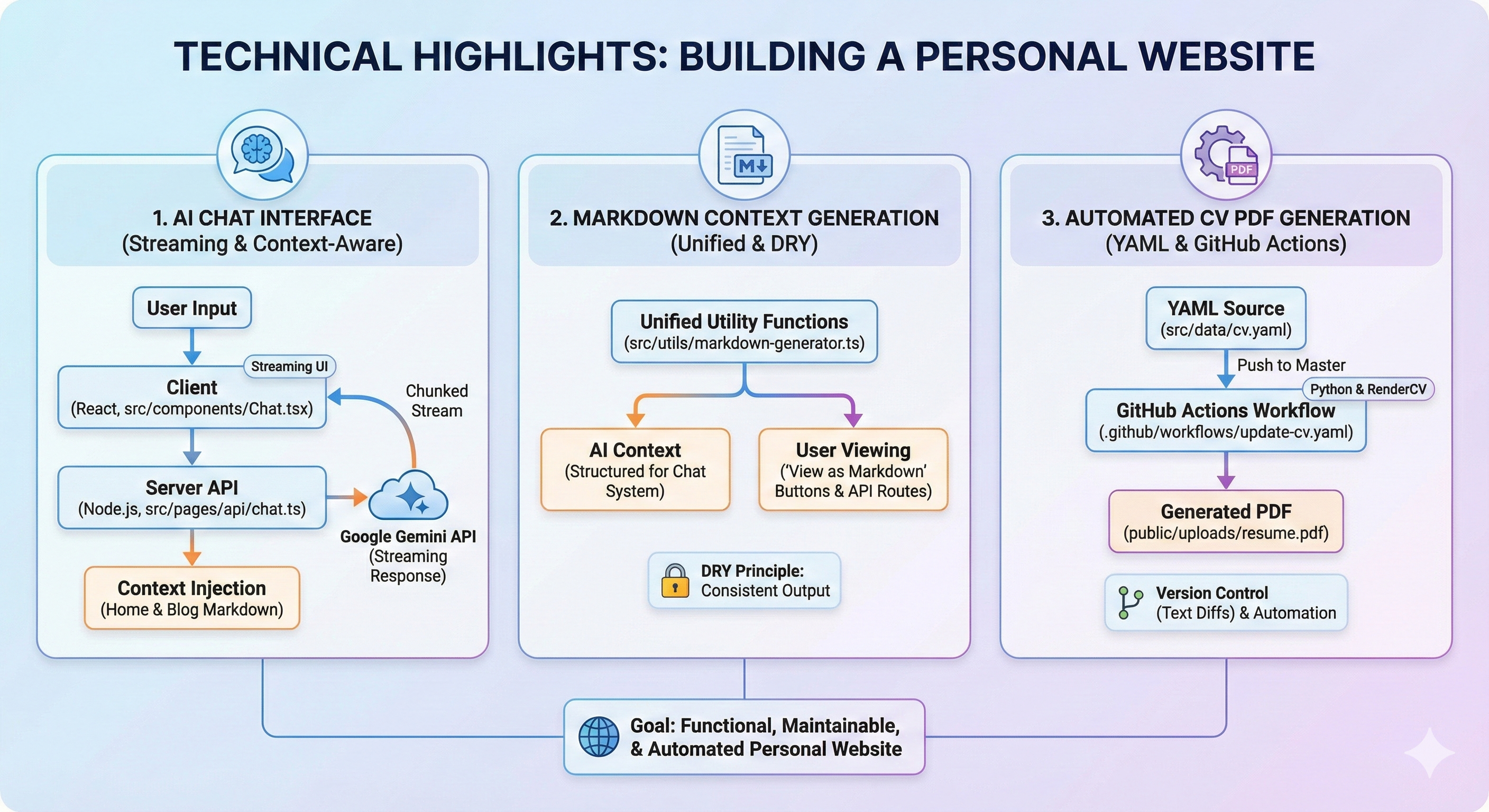
1. AI chat interface
The chat interface allows visitors to ask questions about my experience, skills, publications, and blog posts.
Architecture
The chat system consists of two main parts:
- Client-side React component (
src/components/Chat.tsx) - Handles UI, user input, and streaming response display - Server-side API route (
src/pages/api/chat.ts) - Processes requests, generates context, and streams responses from Gemini
Streaming responses
Streaming makes the interface more responsive. The client uses the ReadableStream API to process chunks as they arrive from the server:
  const handleSubmit = async (e: React.FormEvent) => {
    e.preventDefault();
    if (!input.trim() || isLoading) return;

    const userMessage = { role: 'user' as const, content: input };
    setMessages((prev) => [...prev, userMessage]);
    setInput('');
    setIsLoading(true);

    try {
      const response = await fetch('/api/chat', {
        method: 'POST',
        headers: { 'Content-Type': 'application/json' },
        body: JSON.stringify({ messages: [...messages, userMessage] }),
      });

      if (!response.ok || !response.body) throw new Error('Network error');

      // Initialize Stream Reader
      const reader = response.body.getReader();
      const decoder = new TextDecoder();
      let aiResponseText = '';
      setMessages((prev) => [...prev, { role: 'ai', content: '' }]);

      // Read Loop - process chunks as they arrive
      while (true) {
        const { done, value } = await reader.read();
        if (done) break;

        const chunk = decoder.decode(value, { stream: true });
        aiResponseText += chunk;

        // Update UI incrementally
        setMessages((prev) => {
          const newHistory = [...prev];
          const lastMsg = newHistory[newHistory.length - 1];
          if (lastMsg.role === 'ai') {
            lastMsg.content = aiResponseText;
          }
          return newHistory;
        });
      }
    } catch (error) {
      // ... error handling ...
    } finally {
      setIsLoading(false);
    }
  };
The client creates a ReadableStream reader, decodes each chunk using TextDecoder, and updates the UI as text arrives. Responses appear word by word instead of waiting for the full answer.
Server-side streaming with Gemini
On the server, the API route constructs the context from the website content and streams the response from Gemini:
    // Generate streaming response from Gemini
    const result = await chat.sendMessageStream(lastUserMessage);

    // Create ReadableStream for HTTP Response
    const stream = new ReadableStream({
      async start(controller) {
        const encoder = new TextEncoder();
        try {
          for await (const chunk of result.stream) {
            const chunkText = chunk.text();
            if (chunkText) {
              controller.enqueue(encoder.encode(chunkText));
            }
          }
          controller.close();
        } catch (err) {
          // ... error handling ...
          controller.close();
        }
      },
    });

    return new Response(stream, {
      headers: {
        'Content-Type': 'text/plain; charset=utf-8',
        'Transfer-Encoding': 'chunked',
        'X-Content-Type-Options': 'nosniff',
      },
    });
The server uses Gemini’s sendMessageStream() method, which returns an async iterable. Each chunk is encoded and enqueued to the ReadableStream, which the client consumes in real time.
Context injection
The chat has access to the site’s content from two sources:
- Home page content - Biography, experience, publications, and blog post summaries
- Full blog post content - Complete markdown from all blog posts
    // Gather all markdown content for context
    const blogPosts = await getCollection('blog');
    const homePageMarkdown = generateHomePageMarkdown(blogPosts);

    // Get markdown content from all blog posts
    const blogPostsMarkdown = await Promise.all(
      blogPosts.map(async (post: CollectionEntry<'blog'>) => {
        const markdown = await getBlogPostRawMarkdown(post);
        return `## Blog Post: ${post.data.title}\n\n${markdown}\n\n---\n\n`;
      })
    );

    const allBlogPostsMarkdown = blogPostsMarkdown.join('\n');

    // Construct system prompt with all context
    const systemInstruction = `
      You are a professional AI assistant representing Daniel Fridljand...
      // ... persona and rules definition ...

      === HOME PAGE CONTENT (includes CV/Resume information) ===
      ${homePageMarkdown}

      === BLOG POSTS (FULL CONTENT) ===
      ${allBlogPostsMarkdown}
    `;
The system instruction gives the AI access to the site content and defines boundaries intended to prevent hallucination.
Mobile-responsive design
The chat component automatically minimizes on mobile devices (screens smaller than 768px) and can be toggled between minimized and expanded states:
  // Detect mobile on initial load and set minimized by default
  useEffect(() => {
    if (window.innerWidth < 768) {
      setIsMinimized(true);
    }
    // ... resize handler setup ...
  }, []);
When minimized, it appears as a floating button in the bottom-right corner, expanding to a full chat interface when clicked.
2. Context generation and “View as Markdown”
The same system generates markdown representations of pages for two purposes:
- AI Context - Provides structured markdown content to the chat system
- User Viewing - Allows users to view any page as markdown via “View as Markdown” buttons
Markdown generation utilities
The core markdown generation logic lives in src/utils/markdown-generator.ts. This file contains functions to convert different data structures into markdown:
biographyToMarkdown()- Converts biography data to markdownexperienceToMarkdown()- Converts experience entries to markdownpublicationsToMarkdown()- Converts publications to markdownblogPostToMarkdownSummary()- Creates summaries of blog postsgenerateHomePageMarkdown()- Combines all sections into a single documentgetBlogPostRawMarkdown()- Reads and reconstructs full blog post markdown
The generateHomePageMarkdown() function combines all home page content:
export function generateHomePageMarkdown(blogPosts: CollectionEntry<'blog'>[]): string {
  let markdown = `# Daniel Fridljand - Personal Website\n\n`;
  markdown += `This page contains my professional biography, experience, and blog posts.\n\n`;
  markdown += `---\n\n`;
  markdown += biographyToMarkdown();
  markdown += `---\n\n`;
  markdown += experienceToMarkdown();
  markdown += `---\n\n`;
  markdown += publicationsToMarkdown();
  markdown += `---\n\n`;
  markdown += `# Blog Posts\n\n`;

  const sortedPosts = [...blogPosts].sort(
    (a, b) => b.data.pubDate.getTime() - a.data.pubDate.getTime()
  );

  sortedPosts.forEach(post => {
    markdown += blogPostToMarkdownSummary(post);
  });

  return markdown;
}
For blog posts, getBlogPostRawMarkdown() reads the original MDX file and reconstructs it with frontmatter:
export async function getBlogPostRawMarkdown(post: CollectionEntry<'blog'>): Promise<string> {
  // Reconstruct frontmatter from post data
  let markdown = `---\n`;
  markdown += `title: "${post.data.title}"\n`;
  markdown += `pubDate: ${post.data.pubDate.toISOString()}\n`;
  // ... other frontmatter fields (updatedDate, tags, math, image) ...
  markdown += `---\n\n`;

  // Read original MDX file from filesystem
  const fs = await import('fs/promises');
  const path = await import('path');
  try {
    const filePath = path.join(process.cwd(), 'src/content/blog', `${post.id}.mdx`);
    const fileContent = await fs.readFile(filePath, 'utf-8');

    // Extract content after frontmatter
    const frontmatterEnd = fileContent.indexOf('---', 3);
    if (frontmatterEnd !== -1) {
      const content = fileContent.substring(frontmatterEnd + 3).trimStart();
      markdown += content;
    } else {
      markdown += fileContent;
    }
  } catch (error) {
    // ... fallback error handling ...
  }

  return markdown;
}
This function reads the original MDX file from the filesystem, extracts the content after the frontmatter, and reconstructs a complete markdown document with the frontmatter included.
API routes for markdown
Two API routes serve markdown to users:
/index.md- Serves the home page as markdown/post/[slug].md- Serves individual blog posts as markdown
Both routes use the same utility functions used by the chat system:
export const GET: APIRoute = async () => {
  try {
    const blogPosts = await getCollection('blog');
    const markdown = generateHomePageMarkdown(blogPosts);

    return new Response(markdown, {
      headers: {
        'Content-Type': 'text/markdown; charset=utf-8',
      },
    });
  } catch (error) {
    console.error('Error generating home page markdown:', error);
    return new Response('Internal Server Error', { status: 500 });
  }
};
export const GET: APIRoute = async ({ params }) => {
const slug = params.slug;
if (!slug) {
return new Response('Not Found', { status: 404 });
}
const blogPosts = await getCollection('blog');
const post = blogPosts.find((p: CollectionEntry<'blog'>) => p.id === slug);
if (!post) {
return new Response('Not Found', { status: 404 });
}
try {
const markdown = await getBlogPostRawMarkdown(post);
return new Response(markdown, {
headers: {
'Content-Type': 'text/markdown; charset=utf-8',
},
});
} catch (error) {
console.error('Error generating markdown for post:', error);
return new Response('Internal Server Error', { status: 500 });
}
};ViewAsMarkdown component
The “View as Markdown” buttons are implemented as a simple React component that links to these API routes:
export default function ViewAsMarkdown({ href, label = 'View as Markdown' }: ViewAsMarkdownProps) {
  return (
    <a
      href={href}
      className="inline-flex items-center gap-2 px-4 py-2 bg-surface-elevated hover:bg-surface border border-surface rounded-lg text-sm text-heading transition-colors"
      aria-label={label}
    >
      {/* SVG icon */}
      {label}
    </a>
  );
}
This component is used in the Biography section and on blog post pages, where it links to the markdown version of the page.
The same functions therefore generate the AI context and the user-facing markdown. That keeps the format consistent, puts changes in one place, and lets users inspect the content available to the AI.
3. Resume PDF sync
This website does not own CV source or rendering. The resume PDF is built into public/uploads/resume.pdf and served at /uploads/resume.pdf, and is an artifact only. A separate CV_management repository holds the CV source (YAML), uses RenderCV to generate the PDF, and syncs the result here via a GitHub Actions workflow that opens a PR with the updated public/uploads/resume.pdf. This keeps rendering and tooling in one place and leaves the website repo with just the file to serve.
The codebase is open source on GitHub.